What Is GPT Image 2? 5 Areas It Looks Better
GPT Image 2 has not launched officially, but early leaks point to gains in text rendering, photorealism, UI generation, and dense scene control.
GPT Image 2 has not been officially released by OpenAI, and that has not stopped people from talking about it like it already changed the category.
I get why. The leaked samples are the kind of thing that spreads fast: weird aliases, short-lived public tests, and images that seem unusually good at the exact tasks older models keep fumbling.
What keeps pulling me back to this story is not just that the images look better. It is where they seem to look better: text rendering, photorealistic detail, real interface structure, dense compositions, and screenshot-style visuals.
So this is not a hype post, and it is not a debunk either. It is a more grounded read on what looks genuinely different, what still feels slippery, and why GPT Image 2 has people paying attention already.
GPT Image 2 has not been officially released yet
Before getting into the hype, the most important point is this: GPT Image 2 is not officially documented by OpenAI at the time of writing.
OpenAI’s public image model documentation currently points to the GPT Image family already available through its platform, including gpt-image-1.5, gpt-image-1, and gpt-image-1-mini. There is no official GPT Image 2 model page, API page, or pricing page yet.
So when people discuss GPT Image 2 today, they are usually relying on:
- leaked or briefly exposed test models
- community-shared outputs
- blind testing platforms and social posts
- third-party writeups summarizing early impressions
So yes, GPT Image 2 is a real topic. But it is still a pre-release one. The safest way to cover it is as an early signal, not a finished product.
Why people think it could be OpenAI’s next major image model
A large part of the current attention comes from reports that unreleased image models briefly appeared under temporary aliases on public evaluation platforms and were then removed quickly.
That pattern is interesting for two reasons:
- the model was strong enough for people to notice immediately
- the outputs looked different enough from existing public models that users started treating it like a real new release candidate
Across community writeups, the same themes appear again and again:
- much stronger text rendering
- more convincing photorealism
- better understanding of real interfaces and visual structures
- stronger performance on dense or difficult scenes
- unusually good UI, screenshot, and game-scene generation
Some of the louder claims may still turn out to be overcooked. But the overlap across multiple community reports is hard to ignore.
1. Text rendering looks much stronger
If GPT Image 2 has one headline feature, this is probably it.
For years, text has been one of the easiest ways to expose an AI-generated image. A model could make a decent poster, product box, app screen, or storefront, then ruin the illusion the second you looked closely at the words.
That is why so many of the early GPT Image 2 examples keep circling back to text. People are not reacting to it as a small quality bump. They are reacting like one of the oldest weak spots may finally be getting fixed.
Community-shared samples repeatedly highlight:
- readable signage
- more accurate UI labels
- better product packaging text
- comic-style dialogue bubbles that feel more natural
- handwritten or stylized text that blends into the image more convincingly
- stronger rendering of non-English text, including CJK characters
And this is where the jump starts to matter in real workflows.
A model that can place believable text inside images becomes much more relevant for:
- ad creatives
- social media graphics
- product mockups
- landing page concepts
- packaging concepts
- screenshot-style visuals for product storytelling
- editorial visuals that need visible wording
In older models, text was often the point where the whole image stopped feeling convincing. In early GPT Image 2 examples, it looks less like a sticker slapped on top and more like it belongs in the scene.
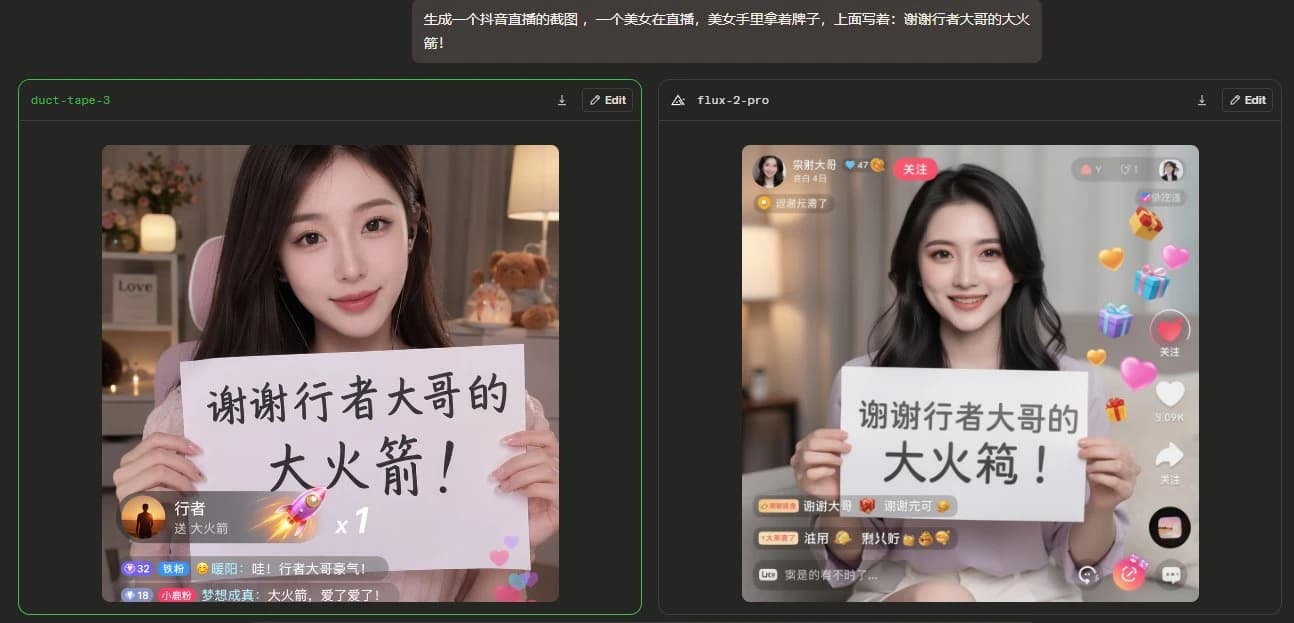
One reason GPT Image 2 is getting so much attention is that community-shared examples suggest it handles longer Chinese text and UI-heavy scenes more cleanly than older image models.
2. Photorealistic images look more convincing
Another major reason people are excited about GPT Image 2 is photorealism.
Earlier image models could already create polished visuals, but many of them still had obvious tells: strange skin texture, inconsistent lighting, awkward fingers, incorrect reflections, or an overall AI gloss that made outputs feel unreal even when they looked impressive at first glance.
Early GPT Image 2 examples are being praised for looking more like actual photography rather than just good AI art.
Reports frequently mention improvements in:
- facial realism
- hand anatomy
- natural lighting
- reflective surfaces such as glasses
- fabric texture
- product-shot realism
- multi-person selfie scenes
Some community observers also claim that earlier visual issues associated with prior GPT Image generations, such as a warm or yellowish cast, appear reduced or gone in leaked examples.
If that holds up in a public release, the payoff is not just aesthetic. It would make the model more useful for commercial visual work, including:
- ecommerce imagery
- lifestyle ad concepts
- branded social assets
- pitch-deck mockups
- marketing storyboards
- editorial and blog visuals
The shift here is simple: the value is not just prettier images. It is images people might actually believe.
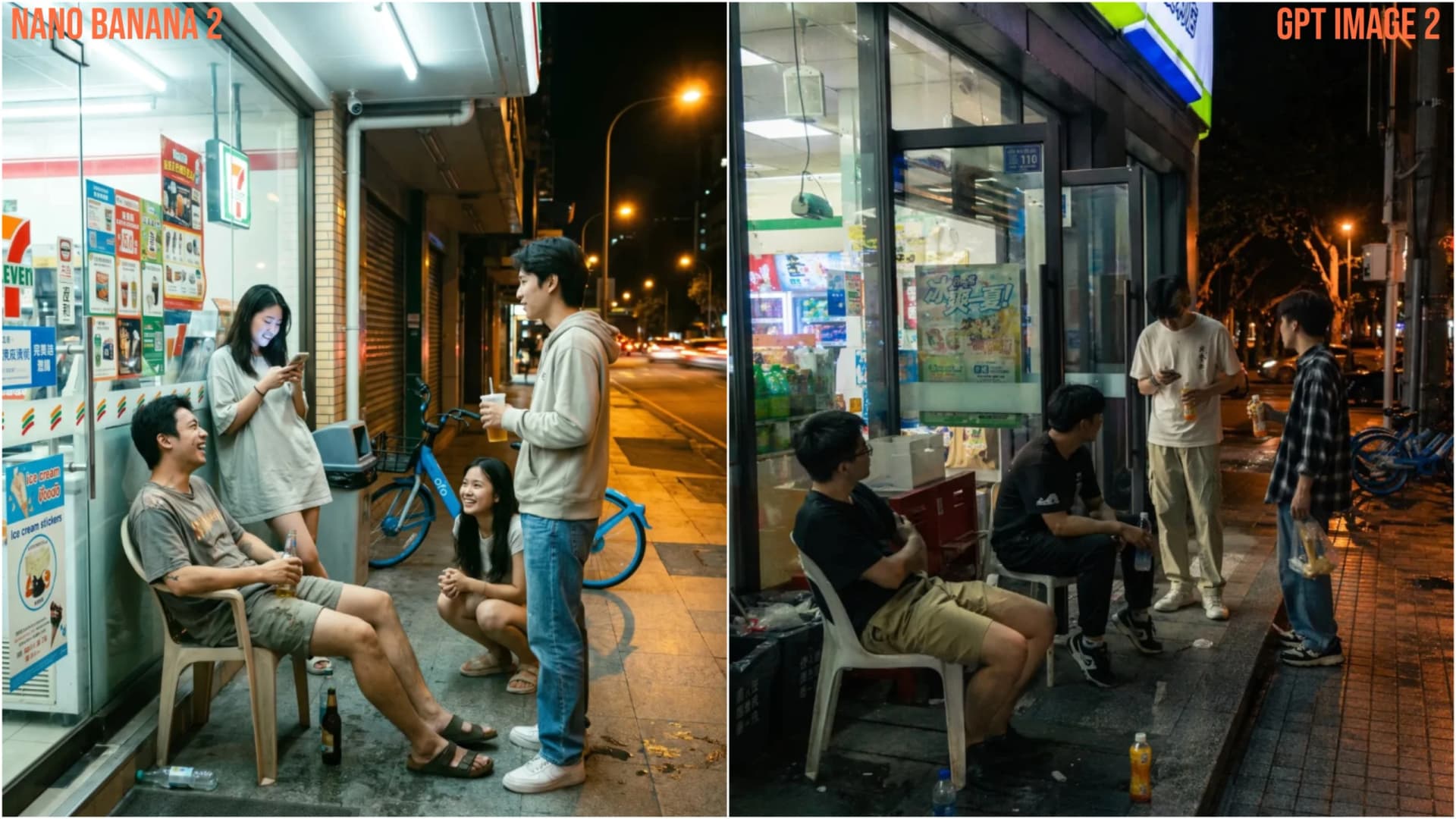
Community-shared comparisons suggest GPT Image 2 is stronger at night lighting, atmosphere, and everyday street-scene realism than older image models.
3. It seems to understand real interfaces and real-world details better
This may be the most interesting capability shift of all.
A lot of image models are good at style. They can imitate moods, camera looks, or general design language. But they often struggle with specificity: the concrete details that make something feel like a real YouTube page, a real operating system window, a real storefront, or a recognizable game UI.
GPT Image 2 is attracting attention because many early examples suggest stronger real-world visual knowledge.
Community examples often point to things like:
- realistic website layouts
- recognizable operating system windows
- more believable app interfaces
- accurate visual structure in product pages
- game interfaces that look closer to actual screenshots
- real-world environments rendered with more specific detail
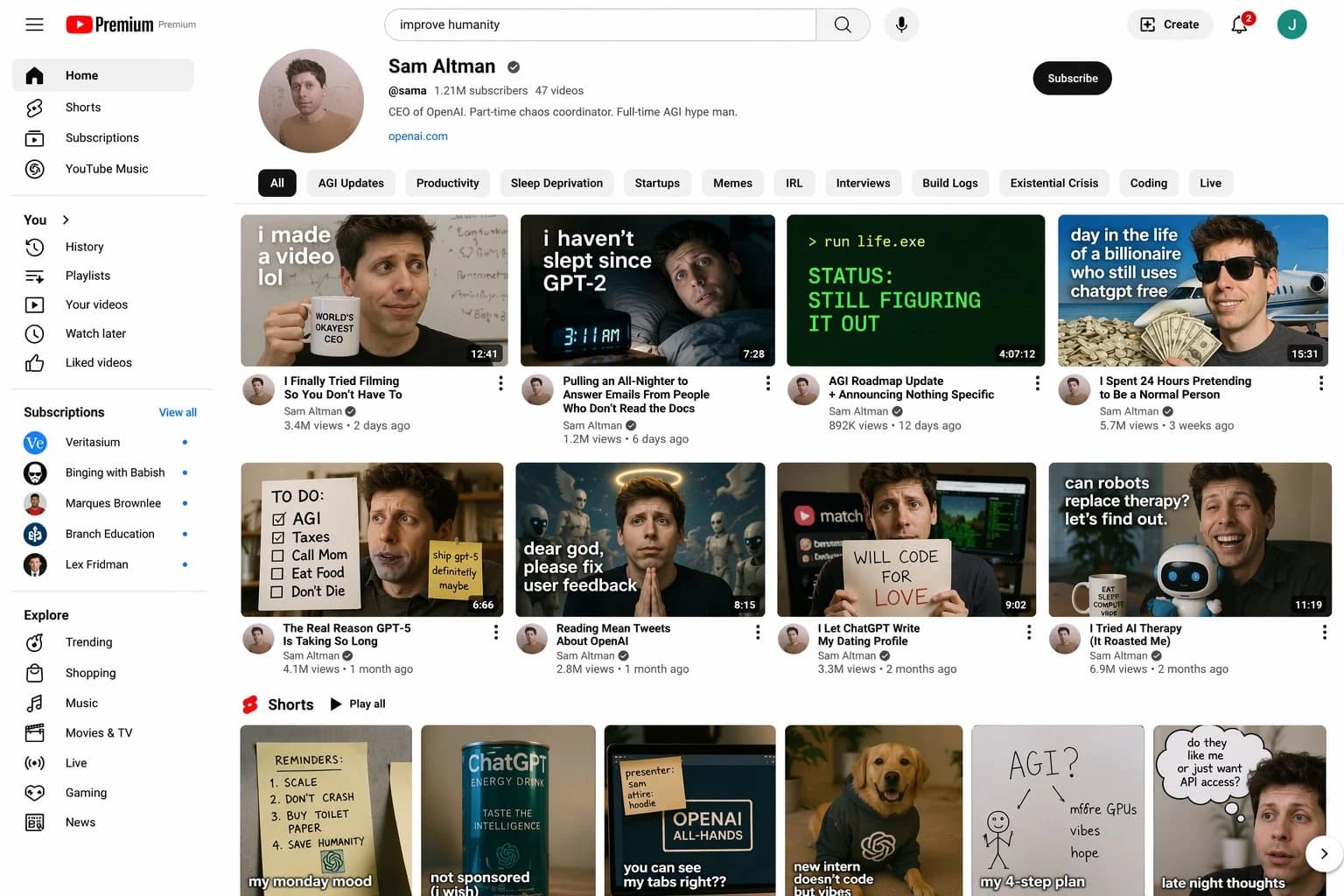
Community-shared examples suggest GPT Image 2 can generate platform-style layouts and interface-heavy scenes that look much closer to a real YouTube-style page.
That suggests a shift from “this resembles the category” to “this looks much closer to the real thing.”
For creators and product teams, that is a big deal.
A model with stronger real-world visual understanding can be more useful for:
- UI ideation
- design exploration
- ad concepting
- software landing page mockups
- product marketing visuals
- tutorial illustrations
- game-inspired concept work
This is one reason GPT Image 2 feels more interesting than a generic “higher quality” upgrade. If it really understands how real interfaces and environments are structured, it becomes much more useful for product, design, and marketing work.
4. Complex scenes appear more stable
Many AI images look impressive until the prompt gets difficult.
The real test is not whether a model can generate a single subject on a simple background. It is whether it can keep a scene coherent when you ask for:
- multiple people
- layered objects
- dense city scenes
- detailed interiors
- interfaces with many labels
- action scenes with a lot happening at once
- compositions where everything has to stay logically arranged
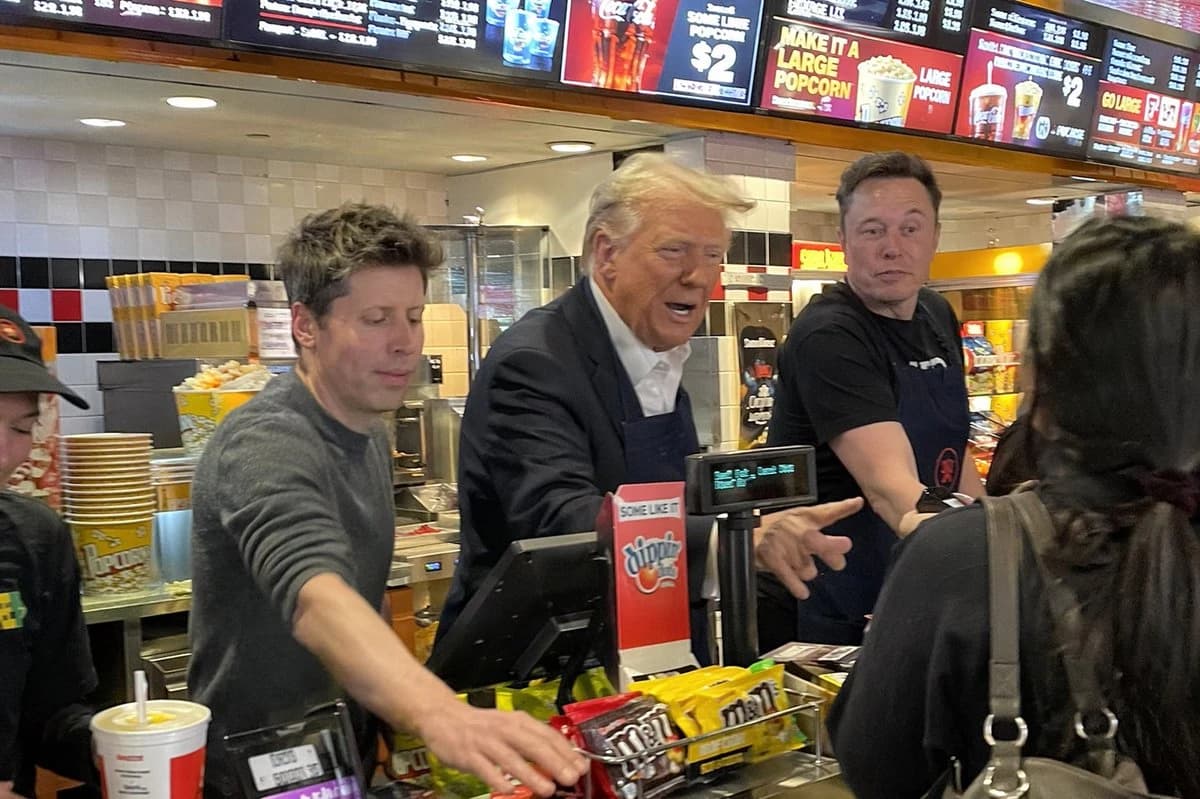
Community-shared examples suggest GPT Image 2 holds together better in crowded, multi-subject scenes with layered objects and detailed interiors than older image models.
This is another area where GPT Image 2 is being praised.
Early reports suggest it performs better on scenes that would normally expose weak coordination in image models. Instead of one part looking good while the rest collapses, the overall image stays more coherent across the frame.
That could reduce one of the most annoying parts of AI image workflows: rerunning the same prompt over and over because one corner of the image breaks.
If GPT Image 2 really is more stable in complex scenes, the practical upside is huge:
- fewer broken outputs
- fewer retries
- more usable first-pass images
- better results for advertising and editorial compositions
- stronger output when prompts involve multiple simultaneous requirements
This is not the flashiest upgrade, but for real users it may be one of the biggest.
5. UI mockups, screenshots, and game scenes may be a major strength
If there is one use case where all of these improvements collide, it is this one.
A lot of the leaked and discussed GPT Image 2 samples focus on things like:
- websites
- software dashboards
- browser windows
- operating system screens
- fictional landing pages
- game screenshots
- HUD-heavy or interface-heavy visuals
This matters because those tasks combine several hard problems at once:
- accurate text
- believable layout
- real-world visual knowledge
- consistency across many small elements
- strong composition
- the ability to mimic highly structured screen-based visuals
Most image models start wobbling when too many of those demands show up in one prompt. GPT Image 2 stands out because it seems better at holding those combinations together.
That makes it especially useful for people doing things like:
- marketers making concept creatives
- founders prototyping product pages
- designers exploring visual directions
- content teams producing blog and newsletter assets
- creators making fake screenshots for storytelling or demos
- gaming content and UI-driven creative experiments
Put more bluntly, GPT Image 2 may matter less because it makes pretty images and more because it may make usable structured images.
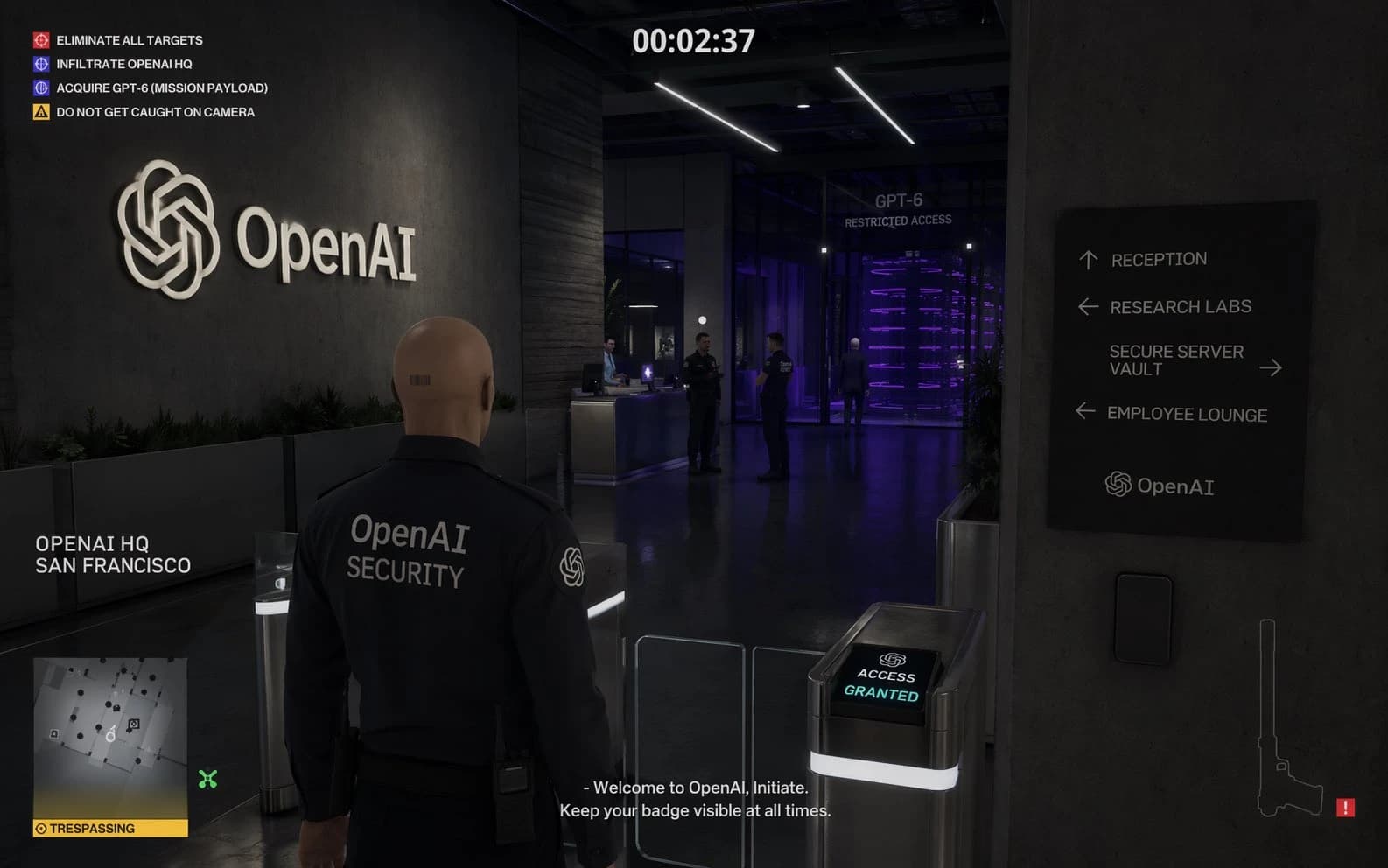
Community-shared examples suggest GPT Image 2 handles game-style HUD elements, signage, and structured screenshot composition more convincingly than older image models.
What is still unconfirmed
As exciting as the early examples are, there is still a lot we do not know.
At the time of writing, the following points remain unconfirmed by OpenAI:
- the official model name
- launch date
- API availability
- pricing
- generation speed
- supported resolutions
- exact editing capabilities
- whether all leaked samples came from the same final model
- whether the strongest examples are representative or cherry-picked
Pre-release discussion can distort expectations fast.
A few impressive examples do not mean every use case is solved. Community excitement usually moves much faster than reliable technical confirmation.
The cleanest way to frame GPT Image 2 right now is this: the leaked examples suggest major gains, but the final product may differ in availability, quality, and cost.
What GPT Image 2 could mean for marketers, creators, and design workflows
Even in its current leaked state, the conversation around GPT Image 2 is useful because it shows where image generation is starting to feel less like a toy and more like a working tool.
If the most widely discussed strengths hold up, GPT Image 2 will probably matter most in workflows that need more than just pretty art.
For marketers, it could mean:
- ad concepts with believable text
- stronger product visuals
- more convincing campaign mockups
- faster visual iteration for landing pages and social creatives
For creators, it could mean:
- better thumbnails and editorial graphics
- more useful visual storytelling
- fake screenshots that actually look real
- cleaner concept art that needs less manual cleanup
For product and design teams, it could mean:
- more realistic UI mockups
- better visual ideation
- quicker exploration of branded layouts
- more usable early-stage interface concepts
The bigger story here is not just better quality. It is that AI image generation may be moving from “good for inspiration” to “good for structured commercial visuals.” That is a much bigger shift.
If you want a practical way to turn image ideas into usable creative assets today, try our AI Image Generator while the next wave of image models keeps evolving.
Final take: hype, signal, and what to watch next
GPT Image 2 is still wrapped in rumor, but the interest around it is not random.
What makes it interesting is not that it looks a little better across the board. It seems stronger in the places where older models usually gave themselves away: text, interfaces, structured layouts, photorealism, and difficult compositions.
That is why people keep talking about it.
If future official details line up with what current samples suggest, GPT Image 2 may end up being more than another model refresh. It may be one of those releases that changes what people expect image generation to be good at.
Until OpenAI publishes official details, the best approach is still the boring one: stay curious, stay skeptical, and pay close attention to the tasks where the model seems to create not just prettier images, but more usable ones.
Author

More Posts
Veo 3.1 Prompts: Fix What’s Making Videos Fail
Learn how to fix common Veo 3.1 prompting mistakes, think like a director, and get more coherent video results with better-matched audio.
Seedance 2.0 Brings Commercial Grade AI Video
Seedance 2.0 is trending because its outputs look like usable footage for ads, product pages, and brand posts without apologizing for artifacts.
What Is HappyHorse 1.0? What We Know So Far
What is HappyHorse 1.0? This explainer covers why it surfaced so quickly, what public evidence supports, and which claims still remain unverified.